
DJI Care Refresh: The Ultimate Guide

If you fly, film, or travel with a DJI product in Australia, DJI Care Refresh is the plan that covers accidental damage — crashes, water, and flyaway on eligible aircraft — and gets you a replacement without buying the whole kit again.
This guide covers the current 1-year, 2-year, and 3-year options, how Care Express works, D1’s exclusive same-day in-store replacement, which products get International Warranty Service, and how to buy and bind a plan at D1 Store.
Quick take:
- Same-day replacement in store — exclusive to D1 Store. Normal Care Express averages 3 days. Walk in and swap on the spot. That’s about 99% faster.
- Buy it with the product if you can. Drones must be bound within 48 hours of activation. Handhelds and gimbals have 30 days.
- Start with the 2-Year Plan on most products. Unused replacements from year one carry over.
- Coverage can run to three years — either a 2-Year Plan plus a 1-Year renewal, or three 1-Year Plans stacked.
- Missed the window? If the product is under two months old and still like-new, D1 can still verify it.
Shop DJI Care Refresh · Find a store · Activation guide
Why Care Refresh is worth it
Exclusive in-store Care Refresh replacement at D1 Store — on the spot, not a 3-day wait.
Faster than a normal Care Express claim. The usual average is 3 days. D1 does it while you wait.
Save up to 80% versus buying a new product. You pay the listed replacement fee, not the full retail price.
During the plan, official warranty on covered parts also stays in place. If something fails from a manufacturing fault — not user damage — DJI still repairs those parts under warranty.
Same-day replacement, only at D1
Standard Care Express averages about 3 days: register the case, pay the fee, send the damaged unit back, then wait for the replacement to ship.
D1 Store is the only place that replaces Care Refresh in store, on the spot. Bring the damaged product in with a valid plan and we swap it while you wait. That cuts the wait from days to minutes — about 99% faster than a normal Care Express claim.
Nobody else in Australia offers this. If you are not near a store, the standard 3-day Express path still works. If you can get to a D1 counter, skip the courier wait.
Find a D1 Store · How in-store swaps work
1-Year, 2-Year, or 3-Year?
There is no single 3-year SKU. Three years is a combination: a 2-Year Plan plus a 1-Year renewal, or three 1-Year Plans in a row. You cannot renew with another 2-Year Plan.
| Plan | Coverage | Replacements | Best for |
|---|---|---|---|
| 1-Year Plan | 12 months | Two replacements. One can be a flyaway on eligible aircraft. Unused replacements do not carry over. | Shorter ownership, or adding a third year later |
| 2-Year Plan | 24 months | Four replacements. Two can be flyaway. Unused year-one replacements carry over. | Most buyers — the plan we usually recommend first |
| 3-Year coverage | Up to 36 months | 2-Year + 1-Year, or 1-Year + 1-Year + 1-Year | Keepers, hire kits, and gear that travels constantly |
How the third year works
- 2 + 1: Buy the 2-Year Plan first. Add a 1-Year Plan during the current coverage, or within 15 days after it expires.
- 1 + 1 + 1: Start with a 1-Year Plan, then renew with another 1-Year Plan twice.
- If you buy a 2-Year and a 1-Year together, bind the 2-Year Plan first.
- Renewals are 1-Year Plans only. DJI does not sell a 2-Year renewal.
Replacement counts, flyaway rules, and whether a third year is offered still depend on the product. Check the Care Refresh listing for your model before you assume a three-year path.
What it actually covers
- Accidental damage — crashes, drops, water, and similar accidents on the covered unit
- Flyaway on eligible aircraft, if the aircraft and remote are bound to your DJI account before it happens
- Official warranty on covered parts for the life of the plan
- Care Express replacements on eligible products, with a listed replacement fee
It does not replace common sense. Batteries, consumables, and some accessories sit outside the main plan. Claims need a valid plan bound to Australian stock when you bought Australian Care Refresh. Full terms come in the DJI contract email after you bind.
How Care Express works
Care Express is DJI’s fast replacement path — register the case, pay the listed fee, send the damaged unit back, and DJI ships the replacement. Average turnaround is about 3 days. At D1, you can skip that wait and do the replacement in store the same day.
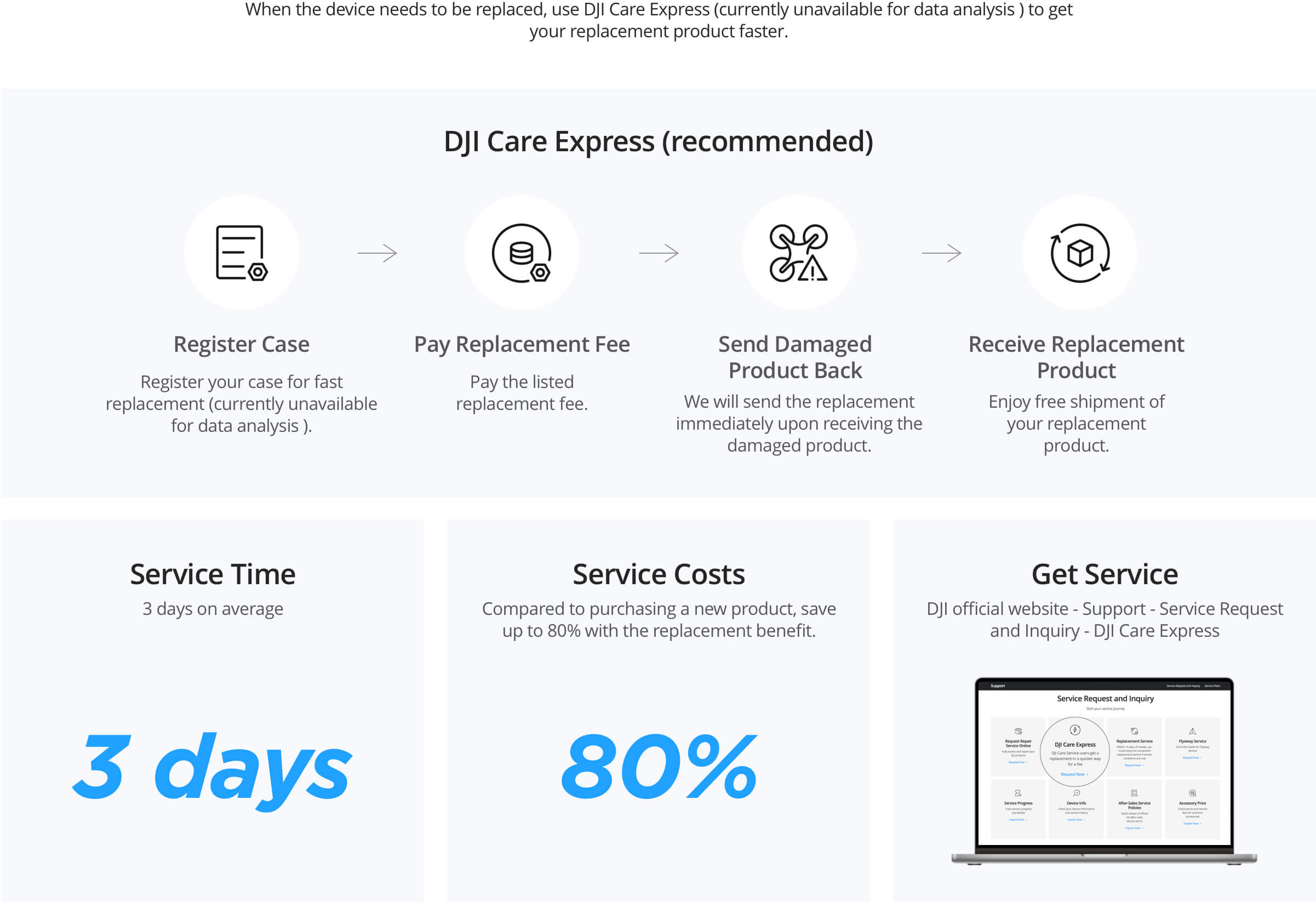
- Register the case through DJI Support / Service Request, or ask D1 if you want help lodging it.
- Pay the replacement fee listed for your model — that is where the “up to 80% vs new” saving comes from.
- Send the damaged product back. DJI ships the replacement once the damaged unit is received, or on the Express path for that model.
- Receive the replacement with free shipment of the replacement product.
If you cannot get to a store, that 3-day Express path is still the fastest mail-in option. If you can, use D1’s exclusive same-day in-store swap instead. Standard repair is also available when replacement is not the right path.
International Warranty Service
Some products include exclusive International Warranty Service. That lets you get replacement or repair at any DJI authorised repair centre across the globe — useful if the camera or gimbal travels with you.
It is not on every drone. DJI currently lists it on selected handhelds and gimbals, including recent Osmo Pocket, Osmo Action, Osmo Mobile, Osmo 360, and RS series models. For any other product, Care Refresh usually only works in the country where you bought the plan.
Two practical rules for Australia:
- Buy the product and Care Refresh from an authorised channel — D1 Store qualifies.
- Australian Care Refresh binds to Australian stock. Check the AU mark on the box barcode before you assume a grey-import unit will bind.
How to buy and bind at D1
- Add the matching Care Refresh plan on the product page, or shop the Care Refresh collection.
- Your activation code is the serial number under Care Refresh on the D1 invoice.
- Bind on the DJI activation portal, or do it in-store with a specialist the same day.
- Enter the product serial from the box barcode, battery compartment, or invoice.
- In DJI Fly, bind the aircraft to your account (and the remote, if you want flyaway cover).
The contract email usually arrives within 5–10 minutes. If the portal says the product has been activated for over 48 hours, use the beyond 48 hours form instead of retrying the same code.
Missed the 48-hour window
If the product was activated more than 48 hours ago, is under two months old, is Australian stock, and has no damage — including water — D1 can still run verification. You send a readable serial close-up plus a full product photo. That usually takes 2–5 business days.
FAQ
Can I buy three years in one go?
Yes. Buy the 2-Year Plan and the 1-Year Plan together, then bind the 2-Year Plan first. Or start with one year and renew later. You cannot buy a single 3-year card.
Does the 2-Year Plan extend official warranty?
Yes — official warranty on covered parts runs for the life of the bound plan. A 1-Year Plan covers that year. A 2-Year Plan covers two years from the bind date. Batteries still follow their own warranty period.
Is flyaway included?
On eligible aircraft, yes — once per year on a 1-Year Plan, twice across a 2-Year Plan. The aircraft and remote must already be bound to your DJI account. Handhelds do not have flyaway cover.
What if I already activated the drone?
Inside 48 hours, bind normally. After that, use Care Refresh beyond 48 hours if it is still like-new and under two months old.
Can I get a Care Refresh replacement the same day?
Yes — exclusive to D1 Store. Walk in with a valid plan and we replace it in store instead of waiting the usual 3-day Care Express average. That’s about 99% faster. Find a store.
Do I need Care Refresh if I bought from D1?
D1 warranty and Care Refresh do different jobs. Warranty covers manufacturing faults. Care Refresh covers accidents. If the product leaves the house, we would buy the plan — and if you claim at D1, the replacement can happen the same day.
Final thoughts
For most people the decision is simple: add the 2-Year Plan when you buy the product, bind it the same day, and claim in store if you ever need a replacement. That is the only same-day Care Refresh swap in Australia — about 99% faster than the usual 3-day Express wait.
If you want help picking the right plan for a specific model, ask in-store or start from the collection — every Care Refresh listing is matched to a product.
Shop DJI Care Refresh · Activation guide · Beyond 48 hours
Coverage, replacement fees, and International Warranty eligibility vary by product and can change. Check the live Care Refresh page for your model, and the DJI contract after binding, before you claim.